Catalog · Human Resources

SYNTELLOGIC RH

Your staff, with a record that stands as proof.

Do you know who came in late, how much overtime you owe and whether last night's patrol happened? Mexico's Federal Labor Law reform requires an electronic record of start and end times from January 1, 2027, and a notebook or a spreadsheet won't meet it. Here your staff record from their phone, with the server's time and their location, and you close the pay period with the facts in front of you.

Focused on: manufacturing plants, construction companies, shops, multi-branch businesses and private security
In this catalog

  1. 01 Staff attendance
  2. 02 Security patrols
Syntellogic · Staff attendance

Attendance control with geofencing and payroll calculation

Who showed up, at what time, from where, and what you owe them.

The problem

Attendance is kept in a notebook or a spreadsheet someone types up by hand, so the pay period closes on memory and trust. Nobody can prove who came in late, how much overtime is owed, or whether field staff clocked in from where they said.

Our solution

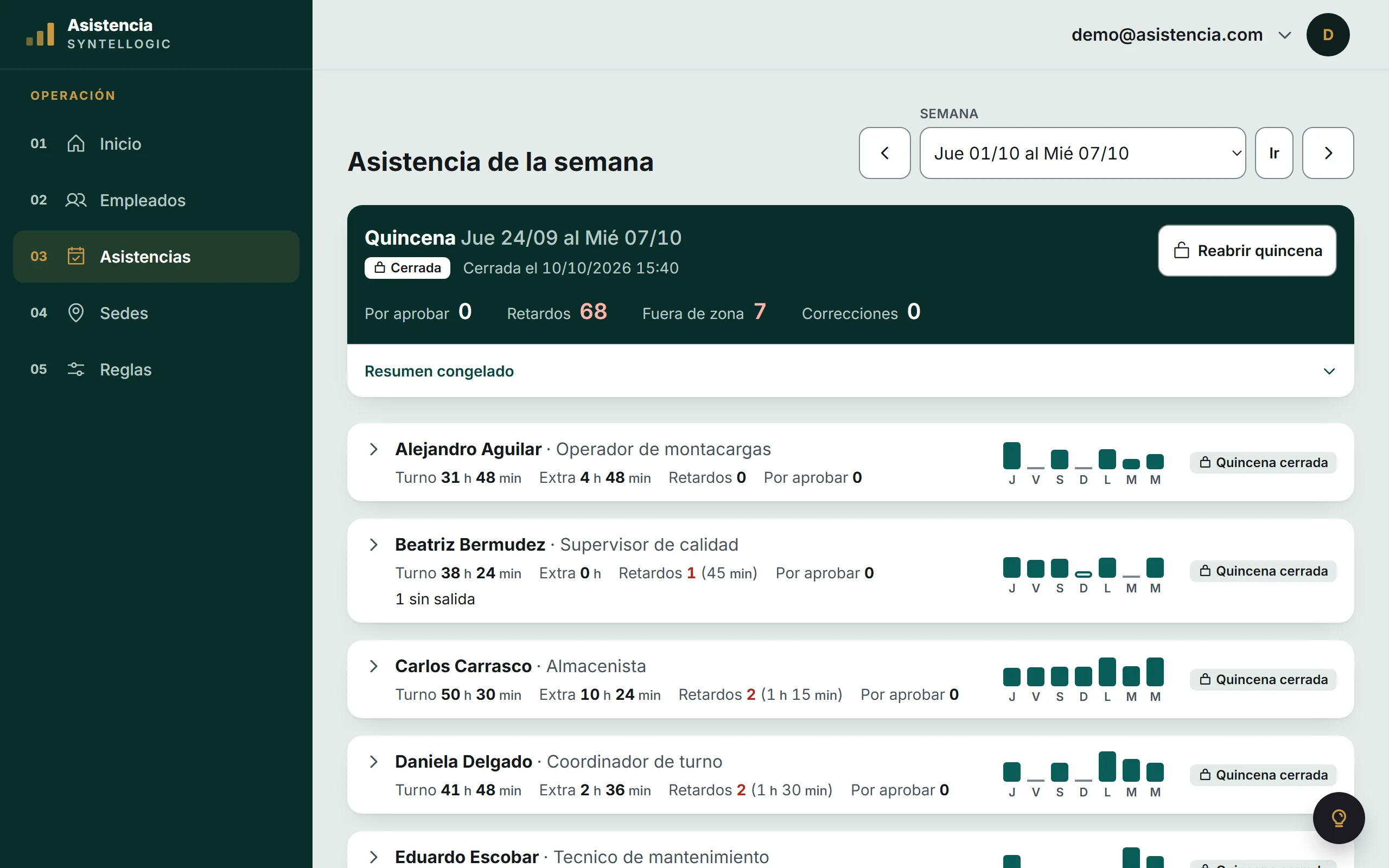
Each employee clocks in from their phone and the system records the time and the location. You define your worksites with a radius, and the rules you pay by: lateness tolerance, shift length, double and triple overtime, Sunday premium and rounding. The week comes out calculated, not typed in.

See the 6 capabilities

Clock in from a phone

Clock-in, lunch out, lunch back and clock-out, with time and coordinates stored by the server.

The benefit: No device to buy per site, and no queues at the time clock.

Geofence per worksite

Each site carries its location and its radius in metres. An out-of-zone punch is flagged, or rejected if you prefer.

The benefit: It answers the first question everyone asks, without having to watch anyone.

Weekly payroll grid

Each employee's week, day by day, split between regular shift and overtime.

The benefit: You review the pay period on one screen instead of reconciling it by hand.

Twelve configurable payroll rules

Lateness tolerance, shift length, lunch deduction, double and triple overtime under article 68, Sunday premium and rounding.

The benefit: The system pays the way you pay, not the other way around.

Photo on clock-in

The employee can attach a photo when clocking in, stored with the record.

The benefit: Evidence of who punched, not just which phone did it.

Employee records and roles

Position, hire date, status and photo, with separate access for administrator and employee.

The benefit: Nobody edits anybody else's hours, and you know who recorded what.

How it works, in 3 steps
01

Your worksites are set up with their location and radius, and your employees with their position.

02

Everyone clocks in from their phone; the server stores the time, the location and whether it fell inside the zone.

03

You open the week and see the hours already split by your rules, ready to pay.

Syntellogic · Security patrols

Field staff control with georeferenced patrols

Zero simulations. Irrefutable evidence on every route.

The problem

Uncertainty about whether security personnel actually perform their night patrols, or whether logistics fleets follow their established routes without detours.

Our solution

A mobile app connected to a control panel. The guard or operator reaches key points (nodes), takes an evidence photo, and the system automatically captures the exact GPS coordinate and time. The security patrol can be tested online, with its panel and its reports; adapting it to fleets and deliveries is custom development per project.

See the 6 capabilities

The full route on the map

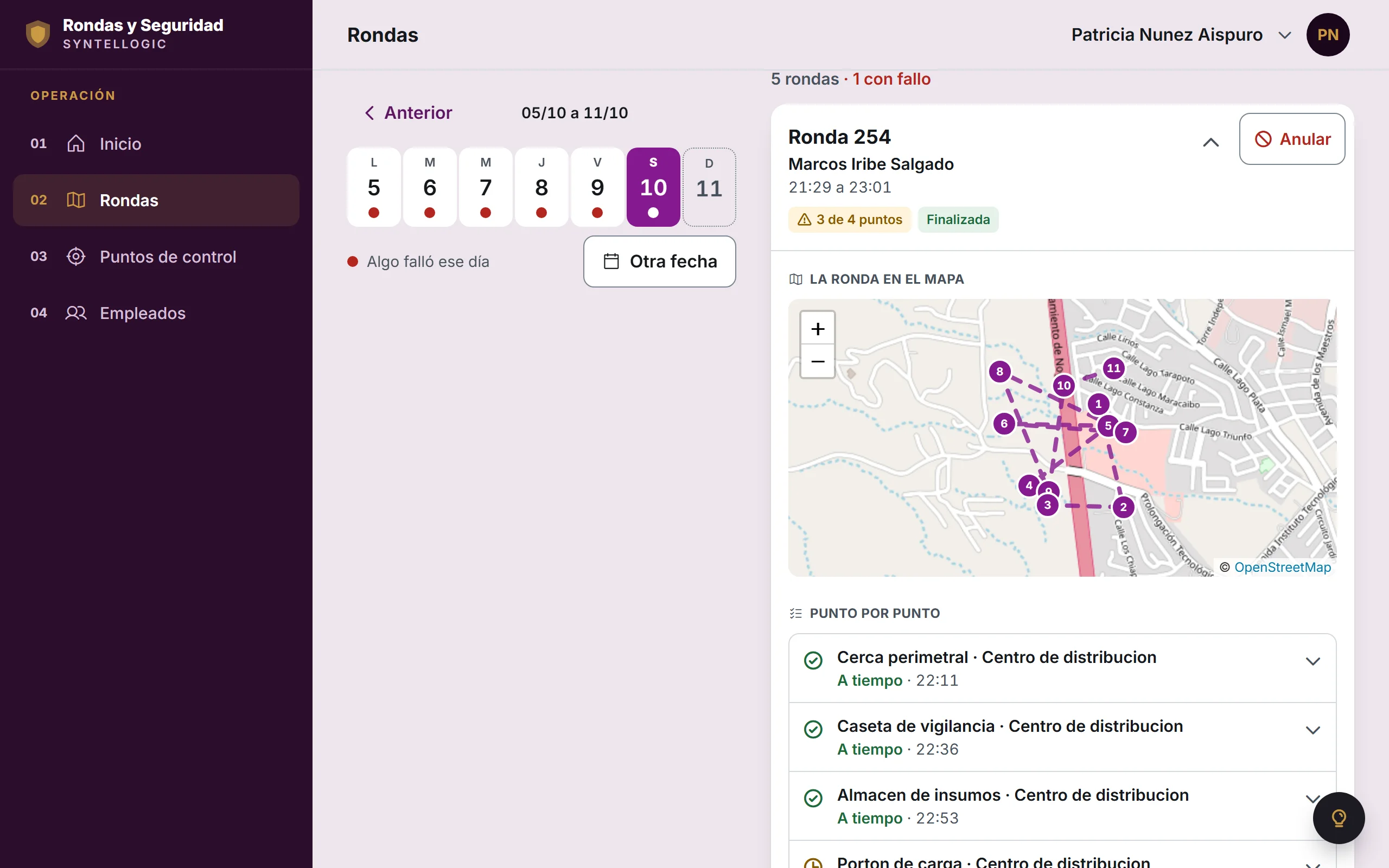
The guard sees their route drawn on the phone as they check in at each point. You open the patrol from your panel and see it whole on the map, with the photo and the time of every check-in.

The benefit: You no longer depend on verbal reports or trusting that "the patrol really happened". You open the patrol and see where they went, at what time, and with what evidence.

Georeferenced photo evidence

At every checkpoint, the app asks the guard to take a photo, which is automatically saved with the exact GPS location and time.

The benefit: You have real, impossible-to-fake proof that the route was completed. In the event of an incident, theft, or dispute with a client, you have concrete evidence, not just your word.

Missed-checkpoint alerts

If a guard was supposed to pass through a specific point within a certain time window and didn't, the system notifies you automatically.

The benefit: You find out about a security issue the moment it happens, not the next day when there's nothing left to do about it.

Exportable route report

With one click, the system builds a PDF document with the map, the photos, and the timestamps of every point visited.

The benefit: When a client asks to prove the service was fulfilled, or an insurer needs evidence after an incident, it's already ready, no manual assembly needed.

Day-by-day lookup, patrol by patrol

Pick a date and see every patrol from that day: who did it, when it started and ended, which points were checked and which were missed.

The benefit: You review a full day on a single screen, with the facts in front of you, instead of reconstructing it by asking around.

Delivery confirmation with signature

Custom development per project for logistics: the driver takes a photo of the delivered package and asks the client to sign on the phone's screen. What the online demo shows is the security patrol, where the signature is captured when the route is closed.

The benefit: It eliminates "it never arrived" disputes: you have photo, signature, location and exact time for every delivery, protecting both your company and your client.

How it works, in 3 steps
01

The nodes or checkpoints of the route are defined (gates, risk zones, delivery stops).

02

The guard or operator arrives at each point and takes a photo from the app; GPS and time are logged automatically.

03

You view the actual route on a map and get alerts if any point wasn't completed.

What your record already keeps

Try it with your staff

Try the system before you decide.

Explore both systems yourself: sample data, nothing to install.

Not sure which one you need? Answer one question →